
How To Use GoHighlevel CRM For Beginners [Full Tutorial]
Home > Email marketing > How To Use GoHighlevel CRM For Beginners [Full Tutorial]
One of the most underrated aspects of creating a successful business is customer relationship management (CRM). After all, the backbone of your company is people. Understanding how to keep your clients happy is step #1 in developing a winning business strategy.
With so many CRM solutions on the market today, it isn’t easy to know which one to go with. Go Highlevel CRM is one of the top software for businesses who want an all-in-one sales and marketing platform to scale their agencies.
Fact: 61% of customers won’t bother about your product or service if their customer experience (including your customer support) doesn’t meet their expectations.
To avoid this, you need to implement great customer relations, and that’s where intelligent CRM software, like Go Highlevel, is a huge help.
This tutorial outlines all you need to know about the Go Highlevel CRM for beginners to make your customer management processes effortless. Learn how to keep track of customer interactions and data, enhance relations with great leads strategies, track productivity, and more.
In this article, we’ll share all you need to know about the features, applications, and benefits of Go Highlevel CRM, and how to get started today.
Go Highlevel CRM Overview
Firstly, let’s clarify something… Is it Highlevel or Go Highlevel?
The straightforward answer is both! The business is often referred to as Highlevel CRM or Go Highlevel CRM (you might have also seen it written as “Go High Level software”). The point is, it’s all the same!
What is Go Highlevel CRM?
The Go Highlevel CRM software, launched in 2018, allows you to manage leads, clients, funnels, track data, and more—an all-in-one platform.
It provides detailed data tracking and analysis, high-level integrations, a mobile app, a page builder, marketing automation, prompt bookings and content, and pipeline management.
You can also integrate other apps into the CRM system, like RingCentral and Zapier, for example (we’ll go into this more below). To learn the ins and outs of all the features, you could watch Go HighLevel tutorials online; there are plenty of them.
We’ve covered all you need to know in this Go Highlevel tutorial. After reading, feel free to watch the YouTube video to deepen your learning.
What Are the Features of Go Highlevel CRM Software?
What makes Highlevel CRM the best platform to capture, nature, and convert customers without the need to juggle between tools?
It is Highlevel CRM’s comprehensive features that make it all possible.
Marketers, agencies, and entrepreneurs predominately working with online services and products can monitor, automate, and enhance customer relationships with Go Highlevel. The result? A streamlined workflow for greater productivity.
CRMs come in all shapes and sizes, some more basic than others. The Go Highlevel features have covered all the bases, giving business owners way more options to customize the software for what they need.
Here are the top Go Highlevel CRM Software features:
1. Excellent Automation
Automating your lead capture page, social media, marketing messages, and email campaigns is possible with Highlevel CRM.
You only need to customize your automation to reflect your campaign goals. From this, expect a boost in your advertising, customer journey, and, importantly, sales.
1. SMS Marketing
Whether you need SMS to answer clients’ questions or promote your service, sending a message directly to the client’s phone gives you confidence that they’ll read it.
You can even send messages in bulk. The Highlevel SMS interface offers all that in addition to efficient replying, editing, monitoring, and saving texts.
3. A Comprehensive Page Builder
You can build landing pages, lead forms, sales funnels, surveys, and a website with Go Highlevel CRM. The process takes a few minutes and doesn’t require complex technical knowledge.
Here’s how you do it:
Browse the form builder
Create and fill out the form
Add custom features, from color and sections to columns
Save and confirm.
It’s a drag-and-drop affair! You can use available templates or embrace custom designs.
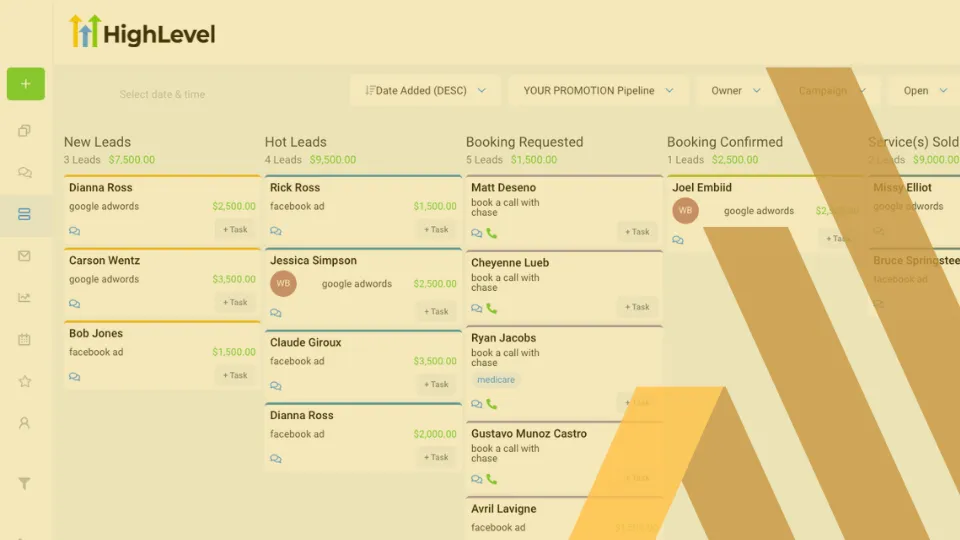
4. CRM & Pipeline Management
It’s no secret that a lot goes on before you convert leads into sales. Many businesses end up losing potential clients in the process due to ineffective follow-up and communications.
This is where Highlevel’s pipeline management comes in, allowing for integration with other apps so you can manage the pipeline efficiently. Monitor what’s happening in real-time and make prompt decisions.
5. Appointment Scheduling
Automate your appointments and bookings with a Highlevel calendar. Share the Calendar with your prospects or clients to have them schedule an appointment.
6. Reputation Management
Some customers forget to leave feedback upon receiving a service, even when satisfied and happy. Highlevel allows you to request a review and let the previous clients post on your suggested review platform.
93% of customers depend on reviews to decide whether to buy a product, which means many positive reviews are excellent for your image.
7. Content Management System
If your agency handles a lot of content, managing the process in multiple apps is tiresome.
With the vast GoHighlevel database, you can generate, proofread, approve, schedule publishing, distribute, and back up your account without changing platforms.
8. Mobile App
Monitoring and executing your agency’s operations from your phone is super convenient.
First, download the app, and enter your Go highlevel CRM login details.
More about this app:
Allows you to import contacts from other apps like MailChimp
Easy to add contact details
See upcoming tasks/workflows in a quick glance.
9. Analytics and Reports
You can get a report on Facebook and Google ads, calls, appointments, and customer attribution from the Reporting section on the dashboard.
Highlevel analytics helps you to understand your website status, team performance, and the health of your work devices to act accordingly.
How Can CRM Software Be Used?
Now that you know what Go Highlevel is used for, you probably want to know, “Does my business need this type of CRM?”
Let’s paint a picture for you:
65% of salespersons embrace CRM, and 97% acknowledge that technology has revolutionized their sales and marketing efforts.
What does that mean?
Small, medium, and large businesses are leveraging CRM like never before because they see the results.
If you want to ease the process of managing your contacts, leads, and sales, you need CRM software. In a nutshell, a CRM like Gohighlevel is used for:
Client Acquisition
Tracking calls and revenues
Reputation and pipeline management
Automation
Call recordings
Bookings
SMS and Email Marketing
And Much More…
In addition to that, here’s a list of businesses where you can use a CRM:
Manufacturing
Sales and marketing agencies
Online course creation
Realtors
Insurance
Education
Health & Medical
Consultancies
Technology
Banking and finance
Non-profit organizations
Customer service
And any other business…
Pro tip: Your current business type, processes, priorities, and goals will influence the choice of CRM you choose.
In a nutshell, since Go Highlevel provides such a huge range of features – it’s very likely that your particular business will benefit significantly from using this CRM.
How to Get Started: Go Highlevel Tutorial
This step-by-step Go Highlevel training guide outlines the process of setting up and optimizing this software.
The onboarding process is easy. Let’s dive in.
Set Up Your Go highlevel Account
Start by clicking here to browse the Highlevel website and sign up for the 14-day free trial if you don’t have a Highlevel account.
Next, create a new business (or client) Highlevel account from scratch.
These five steps will come in handy.
Set up your company logo
Click on the Agency Dashboard in the left column. Highlevel uses the term agency because it was built initially for marketing agencies. Think of an agency as your company.
Move next to Accounts Inside your agency, you can have multiple sub-accounts (CRMs).
Click “Add Account” on the dashboard’s top right to add sub-accounts. You get unlimited sub-accounts if you are on a paid plan.
Go ahead and add an account snapshot, choose a location or add it manually, and put your name and business details.
You now have a new account!
What next?
Read on for more about how Go highlevel works!
Get Things Started with Go Highlevel Phone Software
Set up and configure a few things from “
Settings,” starting with Twilio, SMTP, and Mailgun software.
Twilio
Twilio makes it easy to make phone calls, send voice drops, manage text messages, and download recordings. It is a cloud-based communications third-party app.
Sign up for a new Twilio account from the Highlevel admin panel or website. Here, you add the account name and business phone number for verification.
After signing up for Twilio and getting 100 free credits, go back to Highlevel and check the two boxes to confirm you’ve signed up and received an email from Twilio.
After that, browse the Twilio admin dashboard, copy the Auth Token and Account SID, then paste the details on Highlevel.
Pro tip: Twilio allows you to upgrade and create Twilio sub-accounts to cater to all your clients’ needs. You can later charge clients for these accounts because Twilio bills you from the credit card once you upgrade.
SMTP Service
You need to set up an email service to have emails going on and forth. The best way to achieve that is to integrate the SMTP service.
A Simple Mail Transfer Protocol (SMTP) is a communication approach that allows sending and receiving of emails between the sender and receiver.
Click SMTP, then “Add Provider,” and Set Gmail as the email supplier. Input your Gmail credentials to activate the service.
Mailgun
Mailgun is an email delivery app accessible from the Highlevel dashboard. The software allows you to send bulk emails, perform email analytics, track emails, forward transactional emails, and more.
Sign up for Mailgun for free. You’ll only need to indicate the usual sign-up details, including the billing card number. Check your email for the confirmation link, and all is set.
After signing up, you’ll have 5000 free emails each month for three months. Note that free Mailgun accounts can only send and not receive emails.
Next, create subdomains from Mailgun’s dashboard, then add your subdomain on your DNS account to link the subdomain and main domain.
Pro tip: A single subdomain for all sub accounts works perfectly, even with multiple clients.
Import Your Pipedrive Contacts for CRM
So, how do you add contacts to your Highlevel CRM?
Whether you have Pipedrive, Keep, or Close CRM, it’s easy to import contacts to your Highlevel. Start with exporting all contacts that you have in a spreadsheet.
For instance, your spreadsheet may have the contacts’ first name, second name, business name, phone number, email, date created, pipeline, stage, value, tags, and notes.
Once you have a complete spreadsheet, convert it to CSV and download it. Go back to contacts, click import, and upload your CSV file. Update the contact based on email or phone, ensure no duplicates, and add them to a specific campaign.
How do you add contacts to a Highlevel campaign?
Once you have leads in your CRM, add them to a campaign or Workflow.
Go to Conversations and create a campaign message. With Twilio, Gmail, a
nd Mailgun integrated, you can reach out to each lead via calls or emails without breaking a sweat.
Setting Up and Integrating the Calendar
To set up a calendar, go to account settings, add calendars, and choose your Calendar of choice.
Next, integrate Calendar and ease the booking process. Go to Calendar, book an appointment, and choose the lead and time zone based on the lead’s time.
Other custom changes you can make include appointment title and status, notes, and adding a default meeting link. Click Book when done.
How To Actually Reach Customers
Now that all contacts have been uploaded into Go Highlevel and Calendars up and running, how can you reach out to leads, nurture them, and convert them into actual sales?
Do the following:
Create Outreach Email Templates
Set email marketing inside Highlevel with a few clicks. Click Email Marketing and add your preferred template. From the template, drag around and add your text, links, and video content to specific sections.
Once you’re done, go to settings, select who to send to (a few contacts or an extensive list), the subject line, sending time, drip mode, and days of the week to send emails. That’s it!
Automate Your Workflow
Automate Your Workflow
Automation helps you achieve a complete flow of things.
For instance, when someone books an appointment, you want an excellent flow that reminds them about the meeting, what to expect, and a glimpse of testimonials from previous clients.
How to use Go Highlevel automation.
Click “Automation,” then go to Workflow. Create a new workflow from scratch with a Highlevel template. Your Workflow will show how everything flows from top to bottom.
Let’s say you want to put someone through a flow after confirming the appointment. Here’s an example of what to include in the Workflow: Confirmation email, reminder email, and email before one hour.
Also, set a Workflow Trigger. For instance, you can have “24 hours before appointment” as the trigger after the confirmation email. That means after every 24 hours, all the qualifying leads will automatically get a reminder email.
Add “one hour before appointment” to trigger the “reminder email” and send an email reminding leads that the appointment is one hour away.
Remember, it’s not just about emails; you can add Instagram messages, voice drops, SMS, stripe charge, and much more. Alternatives work because you get to provide multi-channel information; leads can notice you fast and respond on time.
You can automate everything in the Workflow, from payments and follow-ups to client reviews.
Create Funnels for Different Clients/Businesses
To create a Highlevel funnel template: Go to Sites, then Funnels, and click on Template Library to get a pre-built template based on who you are and what you want to do (industry specific).
Next, click the selected funnel to add it to your accounts.
Go Highlevel allows you to make and customize funnels inside the platform or on a new tab.
Let’s say you’re in a coaching business; a discovery call funnel is perfect for you.
With the free Highlevel funnel template, which is more of a sales page, fix a few things, and add the page to your accounts.
You can also clone the template to have multiple pages, e.g., the offer page, booking page, and thank you page.
Creating Your Own Blog Page on HighLevel Using WordPress
As of 2022, over 455 million websites, from blogging and portfolios to e-commerce, are made from WordPress. That means WordPress is among the most preferred website builders.
Creating a blog page on Go Highlevel CRM with WordPress integration requires you to copy and paste a few things, and you are done.
Once you log in to your account, click Funnels and go to Websites. Next, click “Add New Page.”
Go ahead and name your added page. You can also customize it more by adding URLs.
You can also add a custom code element to sections that you create before saving and publishing your blog.
Why is Go Highlevel the Best?
If you’ve read Go Highlevel reviews, coupled with what we’ve highlighted so far, it’s evident that Go highlevel is one of the best customer relationship management systems.
The Go Highlevel pros below share more about why it’s a top-rated CMS platform.
Integration
You can integrate several apps with Highlevel without altering anything and have more features to exploit for excellent results.
Integrations are quick and effective—from data transfer, surveys, and marketing to scheduling apps. To integrate the apps effectively, spend a little time on Go highlevel training tutorials that explain how to link them up and use the apps.
Some of the Highlevel integration apps to try out:
Zapier
Squarespace
Kajabi
Wix
Teachable
Paypal
Stripe
ActiveCampaign
ConvertKit
SurveyGizmo
Calendly
Mailchimp
WordPress
Functionality
Thanks to automation, you can easily manage your workflow, create customer journeys, onboard clients fast, and sell like a pro.
Voice drops, texts, and SMSs also make appointment facilitation efficient. Nurturing and converting leads becomes simple.
Membership Platform
Go highlevel allows you to create a membership or move your existing one to the platform and sell your courses. The interface won’t be as complex as other course platforms like Teachable, but there’s everything you need to sell online courses.
It’s easy to add course snippets, customize the page, edit your course, add your site domain, and even add video content.
Highlevel Support Portal
You’ll have all your problems solved or clarified thanks to the detailed approaches that the Go highlevel support team has in place.
Here’s how you can get help:
Video Support
Concierge Migrations
Live chat
Facebook Community
Live Zoom support
Email.
Go Highlevel Pricing and Subscription Plans
You can try the Go Highlevel free trial, but it’s only 14 days, so you need a paid plan for full-time functionality.
Here are the three Go highlevel pricing plans.
1. Starter Account
Are you a solo freelancer, marketer, drop shipper, or budding agency owner looking for a CRM to kickstart and scale your business? Go for a Highlevel Agency Starter Account.
It will cost only $97 monthly while guaranteeing multiple features, including a single account for your client, Mailgun, and Twilio.
2. Freelancer Account
As an agency or freelancer running multiple businesses, you need much more than the starter account provides.
The Highlevel Freelancer Account, also known as Agency Unlimited Account, will serve you best.
Agency owners enjoy a branded desktop app, and multiple sub-accounts for their businesses and clients. The monthly subscription for this plan is $297
.
3. The Agency Pro Account
An upgrade to Freelancer Account graduates you to the Agency Pro Plan, which goes for $497 monthly. It’s the top plan and offers all that Freelancer Accounts feature plus more.
For instance, you get custom Zapier zaps, a mobile app, and resell rights. Other features include conversational bots, enhanced functions, advanced API, split testing, etc.
Go Highlevel CRM FAQ
How do I get started with Go Highlevel CRM?
By reading our Go Highlevel tutorial! We recommend signing up for a free trial, reading this blog to understand the features, and then taking some time to get familiar with all the features. Watch some other Go Highlevel tutorials, and you’ll be ready to use the CRM in your business.
What is GoHighLevel used for?
Go Highlevel is used for customer relations management to run your agency/business smoothly. You can create sales funnels, make a website, build landing pages, manage customer relationships, track appointments, manage memberships, automate email campaigns, and more.
Is the Go Highlevel CRM system easy to learn?
Yes! It’s very intuitive and there are plenty of user guides, Go High Level training and customer support. You don’t need to be a tech-wiz to start using the Go Highlevel CRM. With a little practice, you’ll easily get the hang of it.
Wrapping Up: Go HighLevel Review
That sums it up! All you need to know to get started with Go Highlevel as a beginner.
With excellent tools, resources, and support, Go Highlevel will likely become one of your most helpful business management tools.
Since you’re serious about scaling your business with effective solutions to manage your clients, we assume that’s the same for acquiring those clients, too. The world of customer acquisition can sometimes be just as daunting as customer management, especially for busy entrepreneurs.
At Scaling With Systems, we help you to create a profitable client acquisition strategy that works every time. Want to know more? Book a free consultation call, and one of our advisors will get back to you asap.
Join The Most Successful Businesses On The Planet
HighLevel is the first-ever all-in-one platform that will give you the tools, support and resources you need to succeed with your agency.

Want To Free Yourself from 20 different tools?